
Measure ruler pro1.0.3 - Google Play
You'll be able to see results in few seconds.
Publisher Description
With this intuitive app rule and tape measure you can measure height, width, area and distance and share the results and measures with whoever you want and how you want: mail or social networks.
In this PRO version you can also measure height and width at any level, even if the object is not on the ground, and the area of any surface. The main measures that can be obtained in this version are:
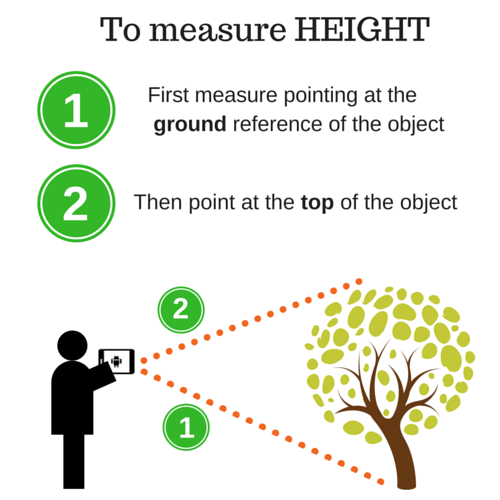
- HEIGHT and WIDTH of objects, people, walls or anything you want to measure that are at your same height or level or at a different one. Much has grown your dog, or how measure curtains you want to replace.
- DISTANCE to any object.
- AREA of a wall or any square surface.
- You can SHARE measurements (distance, height and width) by mail, whatsapp, facebook, twitter and many more.
- You will have more screen view for your measures as the PRO version is with NO ADS.
You easily see if you have room for a piece of furniture, how tall a picture, or the distance to an object. You can measure within a room or outdoors taking as reference the floor.
Simply select whether or not the object is on the ground, whatever you want to measure (height, width or distance to the object) and follow the intuitive steps to get the results.
The steps are simple:
- Set your height in the menu (in meters) and stay standing when taking this measurement.
- Select where is the object (floor / not floor).
- Select what you want to measure: distance, height, width or area.
- Follow the instructions on the green line at the top of the screen
To accurate results, we recommend you to follow these instructions:
- Once you have taken the first step (by clicking the right side button with an icon of a camera) it is important not to move the position of the phone, just change the angle.
- Try to turn the phone on its own axis from the bottom up when measuring the height
- Try to turn the phone on its own axis from left to right when you are measuring the width
- Try turning the phone up and to the right, trying to change the position of the mobile as little as possible, when you are measuring the area.
We hope you like this version!
We'll add more features soon that we are already developing.
About Measure ruler pro
The company that develops Measure ruler pro is The Beachy Sheep. The latest version released by its developer is 1.0.3.
To install Measure ruler pro on your Android device, just click the green Continue To App button above to start the installation process. The app is listed on our website since 2016-08-18 and was downloaded 0 times. We have already checked if the download link is safe, however for your own protection we recommend that you scan the downloaded app with your antivirus. Your antivirus may detect the Measure ruler pro as malware as malware if the download link to com.thebeachysheep.measurerulerpro is broken.
How to install Measure ruler pro on your Android device:
- Click on the Continue To App button on our website. This will redirect you to Google Play.
- Once the Measure ruler pro is shown in the Google Play listing of your Android device, you can start its download and installation. Tap on the Install button located below the search bar and to the right of the app icon.
- A pop-up window with the permissions required by Measure ruler pro will be shown. Click on Accept to continue the process.
- Measure ruler pro will be downloaded onto your device, displaying a progress. Once the download completes, the installation will start and you'll get a notification after the installation is finished.
Program Details
System requirements
Download information
Pricing
Version History
version 1.0.3
posted on 2016-08-18
- You can calibrate the measurement resolution between one or two decimals.,- Improved design for tablet.
Disclaimer
Official Google Play Link
We do not host Measure ruler pro on our servers. We did not scan it for viruses, adware, spyware or other type of malware. This app is hosted by Google and passed their terms and conditions to be listed there. We recommend caution when installing it.
The Google Play link for Measure ruler pro is provided to you by apps112.com without any warranties, representations or guarantees of any kind, so access it at your own risk.
If you have questions regarding this particular app contact the publisher directly. For questions about the functionalities of apps112.com contact us.
